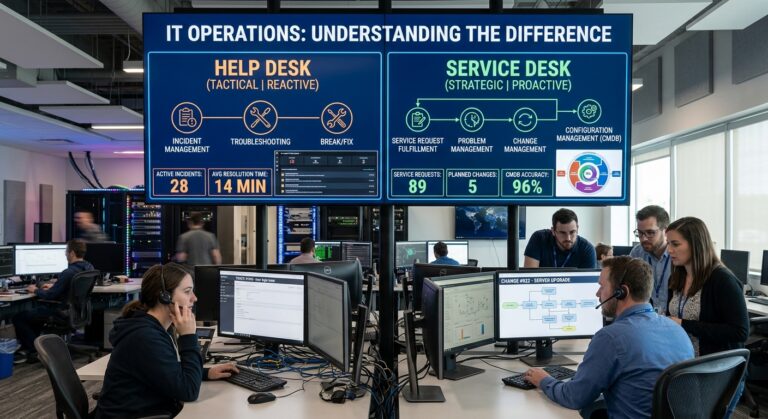
IT support professionals assist employees with technology issues, highlighting the role of in-house, outsourced, and hybrid IT support for small businesses.
Choosing the right IT support for small business is one of the most important decisions an owner makes, yet it is often made in a hurry. Every few weeks, I sit across the table from a business owner who opens with some version of the same sentence: “We just need someone to handle the computer stuff.” Then we start talking, and soon it turns out “the computer stuff” means the Microsoft 365 licenses nobody has audited in two years, a firewall that was installed by a former office manager’s nephew, backups that may or may not be running, and a payroll system that only one employee knows how to log into.
For most of my career as an IT services consultant, I have helped companies with somewhere between five and 150 employees figure out how they should be supported. Interestingly, the question I get most often is not about which laptop to buy or which cloud platform is better. Instead, it is about structure. Should you hire your own IT person? Alternatively, should you hand everything to a managed service provider? Or, is there a middle path?
In truth, there is no universal answer, and anyone who tells you otherwise is usually selling one of the options. What I can give you, however, is the framework I actually use with clients, along with the numbers, the tradeoffs, and the mistakes I see repeated. As a result, by the end you should have a clear sense of which model of IT support for small business fits where your company is today, and also what should trigger a change later.
Why IT Support for Small Business Carries More Weight Than It Used To
Ten years ago, a small company could get away with a “call somebody when it breaks” approach, because the stakes were lower. Today, however, almost every part of a small business runs through technology: invoicing, scheduling, customer records, phones, and in some offices even the door access system.
On top of that, the threat picture has changed in a way that hits smaller companies hardest. For example, Verizon’s annual breach research found that in large enterprises, ransomware played a role in 39% of breaches, while small and medium sized businesses experienced ransomware in 88% of breach cases. In other words, attackers are not skipping small firms because they are small. On the contrary, they are going after them because they are often the easiest door to open.
Consequently, that reality reshapes the conversation. IT support for small business is no longer only about fixing printers and resetting passwords. Rather, it is about whether your business can keep operating after a bad morning.
What IT Support for Small Business Actually Covers
Before comparing models, it helps to be honest about what you are buying. Whenever I map out a client’s environment, the work usually falls into these buckets:
- User help desk: password resets, software glitches, new employee setup, and of course the “my screen is frozen” calls. (If you’re unsure how much structure this needs, see help desk vs service desk.)
- Devices and endpoints: laptops, desktops, phones, printers, as well as keeping them patched and inventoried.
- Network and connectivity: internet circuits, routers and switches, firewalls, wireless access, and also VPN for remote staff. Our small business network setup guide covers the foundations.
- Security: antivirus or endpoint detection, email filtering, multifactor authentication, monitoring, and finally incident response.
- Backup and recovery: making sure data can actually be restored, which, in fact, is not the same thing as making sure a backup job reports “success.”
- Cloud and applications: Microsoft 365 or Google Workspace, line of business software, and licensing.
- Vendor management: dealing with the internet provider, the phone company, and likewise the software vendor’s support line.
- Compliance: HIPAA, PCI, cyber insurance questionnaires, and client security audits.
- Strategy and budgeting: planning hardware refresh cycles, evaluating new tools, preparing for changes like IPv6, and above all aligning tech spend with growth.
Most small businesses need all of these to some degree. Therefore, the real question is who handles which piece, and how well. For this reason, keep this list in mind, since it is the single most useful tool for comparing your options for IT support for small business.
Option One: In House IT Support for Small Business
Hiring your own IT person, or building a small internal team, is the model many owners instinctively prefer. After all, it feels like control. Someone is down the hall, knows everyone by name, and moreover understands why the warehouse scanner has to be rebooted every Tuesday.
Where In House IT Shines
In my experience, internal IT earns its keep in a few specific situations:
- Heavy onsite needs. If your operation depends on physical equipment that must be integrated and babysat, such as a manufacturing floor, a lab, or a multi room medical practice, then having a person physically present has real value. Similarly, one analysis makes the point that if operations require someone physically present throughout the day, for example manufacturing environments with specialized equipment integration, an internal person may be necessary.
- Deep institutional knowledge. Over time, an internal person learns your workflows, your quirks, and your people in a way an outside firm rarely matches.
- Speed for small, frequent requests. Naturally, walking over to someone’s desk beats opening a ticket for a two minute fix.
The Real Cost of an Internal IT Hire
This, however, is where owners often underestimate. According to the U.S. Bureau of Labor Statistics, the median annual wage for computer network support specialists was $76,220 in May 2025, and the median annual wage for computer user support specialists was $61,860.
Keep in mind that this is salary alone. So when I build a cost model for IT support for small business clients, I add payroll taxes, health benefits, paid time off, training, certifications, and in addition the tools that person needs to do the job properly: remote management software, a ticketing system, security consoles, and documentation platforms. As a working rule, I therefore tell owners to expect the fully loaded cost of an employee to land well above base pay, often by a quarter or more, before a single tool license is purchased.
Furthermore, you are buying one person’s skill set. For instance, a great help desk technician is not automatically a strong network engineer, and neither is necessarily a security specialist.
The Single Point of Failure Problem
Above all, this is the issue I raise most bluntly with clients. One provider summarized it well when describing the common trap where the business has made one person responsible for support, security, vendor management, backup checks, project work, and emergency coverage.
So what happens when that person takes two weeks of vacation? Or, worse, what if they get sick during a ransomware incident, or resign and take every admin password with them? In fact, I once walked into a company the week after their sole IT employee left, and consequently we spent the first several days just recovering credentials and figuring out what was running where. Unfortunately, nothing was written down. To be fair, that is not a knock on the employee; one person simply cannot be both the doer and the documenter of everything.
Option Two: Outsourced IT Support for Small Business
The second model, by contrast, is handing IT to a managed service provider, usually called an MSP. Instead of employing staff, you pay a monthly fee, typically per user or per device, and in return the provider handles support, monitoring, patching, security tools, and often strategy.
Notably, this model has become the mainstream form of IT support for small business. For example, research from the Global Technology Industry Association reported more than half of SMBs using managed services providers today. Even so, one caveat is worth knowing: adoption statistics vary a lot depending on how the survey defines “using” an MSP. As one market analysis points out, published surveys of how many small and mid sized businesses already use a managed provider land somewhere between 51 and 88 percent, and the spread comes almost entirely from how each survey defines a user.
What Outsourced IT Support for Small Business Typically Costs
Of course, pricing varies by region, service scope, and how complex your environment is. That said, a recent comparison places outsourced IT for small businesses at roughly $100 to $300 per user per month, with many businesses paying around $150 to $200 per user monthly. For a deeper breakdown, see our guide to managed IT services cost.
Now, do the quick math. For instance, a 20 person office at $175 per user comes to about $42,000 a year. In other words, that is less than the median salary of a single support specialist, before benefits, and besides, it usually includes a help desk team, after hours monitoring, security tooling, and someone senior enough to plan your next three years.
Where Outsourced IT Support Shines
- Breadth of expertise. First, you get access to a bench: help desk staff, network engineers, security analysts, and cloud specialists. Likewise, one firm framed the case for very small organizations directly, noting that for organizations with less than 50 staff, it’s typically best to outsource Tier 1 (and higher) support to a Managed Service Provider.
- Coverage. Second, there are no vacation gaps, and no single person who can walk out the door with your keys.
- Predictable budgeting. Third, a fixed monthly fee is far easier to plan around than surprise emergency invoices.
- Mature tooling. Finally, good MSPs already own enterprise grade monitoring, patching, and security platforms that would otherwise be expensive for a small business to buy and run alone.
Where Outsourced IT Support Disappoints
Still, I would not be doing my job if I only listed the upside. Outsourcing goes wrong in predictable ways:
- Ticket queue culture. Some providers treat you like a number, so your urgent issue sits behind 40 other tickets.
- Thin business context. Similarly, an outside team may not understand why a particular workflow matters to your revenue.
- Maintenance without strategy. One writer observed that outsourced providers are more likely to focus on maintenance and support rather than strategic planning. Indeed, that matches what I see with lower priced providers especially.
- Contract traps. Meanwhile, long auto renewing terms, vague scopes, and “out of scope” project billing can quietly double what you thought you were paying.
Fortunately, the fix for most of these is choosing the provider carefully, which I cover below.
Option Three: Hybrid IT Support for Small Business
The hybrid approach, often called co managed IT, is the model of IT support for small business I recommend more and more as companies grow. Essentially, you keep one or more internal people for the work that benefits from being close to the business, and then you bring in an outside provider to handle the rest.
To put it simply, one clear definition describes it as a partnership where a business’s existing internal IT staff, whether that’s one person or a small team, retains ownership of specific responsibilities while an outside managed IT provider fills in the gaps the internal team cannot reasonably cover alone.
How I Structure Hybrid IT Support
Without a doubt, the most important document in any hybrid setup is what is usually called a responsibility matrix. As one guide explains, this is a simple document that lists every IT function a business needs and assigns ownership of each one to either the internal team or the outside partner.
Remember the list of IT functions from earlier? That, in fact, is your starting point. For example, a typical split I set up for a 60 person company looks like this:
- Internal IT coordinator owns: onboarding and offboarding, onsite device support, relationships with line of business software vendors, and first look at user issues.
- MSP owns: 24/7 monitoring, patch management, backup verification, security operations, network engineering (including VLAN design and firewall rules), and escalated tickets.
- Shared: project planning, budgeting, quarterly reviews, and incident response.
Without that matrix written down and signed off by both sides, however, hybrid arrangements tend to drift into finger pointing. In fact, every client I have seen struggle with co managed IT skipped this step.
Who the Hybrid Model Fits
Generally, hybrid works best when you already have, or are about to hire, at least one capable internal person. Some providers even set a rough threshold, suggesting it is generally most effective for businesses with 50 or more employees and at least one dedicated internal IT person. I agree with that as a guideline; nevertheless, I have seen it work well for 30 person firms with complex regulatory needs.
Moreover, it is a smart transition path. For instance, one analysis describes a common pattern where a company may begin with an outsourced provider, hire an internal technology leader later, and retain external security or after hours support. Indeed, that is exactly how many of my clients evolve.
Side by Side: Comparing IT Support for Small Business Models
| Factor | In House | Outsourced (MSP) | Hybrid |
|---|---|---|---|
| Typical fit | Larger teams, heavy onsite needs | Under roughly 50 employees | Roughly 50 to 250 employees, or regulated firms |
| Cost structure | Fixed salary plus benefits and tools | Monthly per user fee | Internal salary plus scoped service fee |
| Expertise depth | Limited to the people you hire | Broad specialist bench | Business knowledge plus specialist bench |
| After hours coverage | Usually limited | Usually included | Covered by the MSP side |
| Business context | Strongest | Weakest unless the provider invests in it | Strong |
| Key risk | Single point of failure | Generic service, contract traps | Unclear ownership without a matrix |
Five Questions I Ask Before Recommending IT Support for Small Business
Whenever I run a discovery session, these five questions usually make the right answer obvious.
1. How many people and locations are you supporting, and where will you be in two years?
For example, a 12 person firm planning to stay small almost always belongs with an MSP. On the other hand, a 45 person firm planning to double needs a plan that scales, which often points toward hybrid.
2. How much of your support has to be physical?
If most issues can be resolved remotely, then an MSP can cover you well. However, if someone needs to touch equipment every day, you need a person onsite, either internal or a provider with dedicated onsite hours.
3. What are your compliance obligations?
Healthcare, finance, legal, and anyone handling card payments carries regulatory weight. As a result, those requirements demand specialized knowledge that is expensive to maintain with one internal hire.
4. What does an hour of downtime cost you?
Here, I make clients put a real number on this: lost revenue, idle staff, missed deadlines, and reputational damage, including outages that start outside your building, such as internet routing failures. Once that number is on the whiteboard, consequently, the monthly fee for proactive IT support for small business usually looks very different.
5. Who owns IT strategy today?
If the honest answer is “nobody” or “the owner, when there’s time,” then that gap is often more dangerous than slow ticket response. Therefore, whatever model you choose, someone must own the roadmap.
Security: The Part of IT Support for Small Business You Cannot Skip
At this point, I want to spend a moment on security, because this is where I see the most dangerous assumptions. Many small business owners believe their size makes them invisible. Yet the breach data says the opposite. As one summary of Verizon’s findings put it, ransomware groups no longer discriminate based on the size of their victim. Instead, they simply adjust their ransom demands accordingly.
For that reason, whatever model of IT support for small business you choose, make sure these baseline protections are owned by a named person or provider:
- First, multifactor authentication on email, remote access, and every admin account.
- Next, patching on a defined schedule, with reporting you actually review.
- Also, backups that follow the 3, 2, 1 approach (three copies, two types of media, one offsite or immutable), with restore tests at least quarterly.
- Additionally, endpoint detection and response, not just basic antivirus.
- In addition, security awareness training for staff, since phishing still opens most doors.
- Finally, a written incident response plan with phone numbers that work even when email is down.
Fortunately, the free guidance published by CISA and NIST for small businesses is a solid starting checklist, and I link to both in the references below. Ultimately, if your current IT setup cannot show you evidence that each item above is in place, then that is the first problem to solve, regardless of model.
On a brighter note, there is encouraging data too. For example, one survey found that 59% of small businesses state their security posture has improved after working with outside IT vendors. Again, that tracks with what I see, because small firms rarely have the budget to run security tooling and monitoring at the level an established provider can.
How to Vet a Provider of IT Support for Small Business
If you go outsourced or hybrid, then provider selection matters even more than the model itself. Accordingly, these are the questions I make clients ask before signing anything:
- What exactly is included in the monthly fee? Above all, get it in writing, including after hours support, onsite visits, projects, and new user setup.
- What are your response and resolution times? Specifically, look for a service level agreement with defined priorities, not vague promises.
- Who owns our admin credentials and documentation? Clearly, the answer should be “you do,” including your domain registrar and DNS accounts, along with a full handover process if you ever leave.
- How do you handle security incidents? For instance, ask them to walk through their last real incident, without names.
- Will we get a regular strategy review? Quarterly business reviews with a technology roadmap, in particular, separate real partners from glorified help desks.
- What does it cost to leave? Likewise, watch for long terms, steep termination fees, and auto renewals with short notice windows.
- Can I speak with three current clients of similar size? Simply put, any provider that hesitates here is telling you something.
Over the years, I have also learned to spot red flags: a provider that cannot explain its own backup testing process, one that resists giving you admin access to your own systems, and finally one whose sales pitch is all tools and no conversation about your business.
Recommended IT Support for Small Business by Company Size
Admittedly, every business is different. Even so, if you want a starting point, here is how I typically guide clients:
- 1 to 20 employees: Fully outsourced. At this size, an internal hire rarely makes financial sense, and besides, you gain far more expertise for the money from a good MSP. Still, designate one internal staff member as the point of contact, not to fix things, but rather to coordinate.
- 20 to 50 employees: Outsourced, with a strong preference for a provider that offers onsite hours and strategic planning. Meanwhile, start budgeting for a possible internal coordinator if growth continues.
- 50 to 150 employees: Hybrid is usually the sweet spot. In this case, an internal IT lead handles daily operations and business context, while the MSP provides depth, security operations, and after hours coverage.
- 150 and up, or heavily regulated: A capable internal team, although often still supported by specialist outside providers for security, compliance, or major projects.
Keep in mind that these are guidelines, not rules. For example, a 25 person engineering firm with complex design software may need an internal person sooner. Conversely, a 90 person firm that is fully remote may do just fine outsourced.
Final Take on IT Support for Small Business
In the end, the right IT support for small business is not about choosing the cheapest option or the one that feels the most comfortable. Instead, it is about matching the model to your size, your risk, and where you are headed. In house support gives you closeness and control, but it also concentrates risk in a few people. Outsourcing, meanwhile, gives you breadth and coverage but demands careful vendor selection. Finally, hybrid blends both, though it only works when responsibilities are written down and owned.
If you take one thing from this article, then let it be this: whatever model of IT support for small business you choose, make sure someone owns security, someone owns documentation, and someone owns the plan. When those three are covered, most of the other problems become manageable. When they are not, however, no model will save you.
So, start with an honest inventory of what you have, what it costs you when it fails, and who is responsible for each piece. Ultimately, that inventory will tell you more than any sales pitch.
Frequently Asked Questions About IT Support for Small Business
1. How much does IT support for small business typically cost?
Generally, outsourced managed services run about $100 to $300 per user per month, with many small businesses landing between $150 and $200, according to this cost comparison from Nutmeg Technologies. By comparison, an internal hire costs a median salary of roughly $62,000 to $76,000 before benefits, based on BLS wage data.
2. At what size should a small business hire its own IT person?
Typically, many providers suggest outsourcing help desk support below about 50 staff, as outlined by OSIbeyond. Beyond that size, however, a hybrid model with one internal IT lead often becomes cost effective.
3. What is co managed or hybrid IT support for small business?
Simply put, it is a partnership where internal staff keep certain responsibilities while an outside provider covers the rest. For more detail, Entre MT’s guide explains how a responsibility matrix divides the work.
4. Is outsourced IT secure enough for a small business?
In many cases, it is more secure than going it alone, since providers run monitoring and security tools few small firms can afford. Moreover, because ransomware appears in the large majority of SMB breaches according to the Verizon 2025 DBIR, professional security coverage matters.
5. Can a small business switch from in house to outsourced IT, or back?
Yes. In fact, many companies start outsourced, then add an internal lead as they grow while keeping external security coverage, a path described by Nutmeg Technologies. Therefore, the key is owning your credentials and documentation so transitions stay clean.
6. Where can small businesses find free cybersecurity guidance?
For a start, CISA’s Cyber Essentials and the NIST Small Business Cybersecurity Corner both offer free, practical guidance.
References
- U.S. Bureau of Labor Statistics. Computer Support Specialists, Occupational Outlook Handbook. bls.gov
- Verizon Business. 2025 Data Breach Investigations Report. verizon.com
- Global Technology Industry Association. SMB Technology and Buying Trends 2025. gtia.org
- Nutmeg Technologies. Outsourcing IT vs In House: A Practical SMB Decision Guide. nutmegtech.com
- OSIbeyond. When to Keep IT Support In House vs. Outsourcing to an MSP. osibeyond.com
- Entre MT. What Is Co Managed IT? The Hybrid Model Most Small Businesses Don’t Know Exists. entremt.com
- Cloud Secure Tech. MSP Statistics 2026: Market Size, Growth and Trends. cloudsecuretech.com
- Flashpoint. Key Trends in Vulnerability Exploitation and Ransomware: Insights from the 2025 Verizon DBIR. flashpoint.io
- Pinpoint Technologies. Should You Outsource IT or Hire In House? A Cost Benefit Analysis for SMBs. pinpointtech.pro
- Yulys. Outsourcing vs. In House IT Team: Choosing the Right One for Small Businesses. yulys.com
- MSP Companies. What Is Co Managed IT? mspcompanies.us
- CISA. Cyber Essentials. cisa.gov
- NIST. Small Business Cybersecurity Corner. nist.gov
About the Author