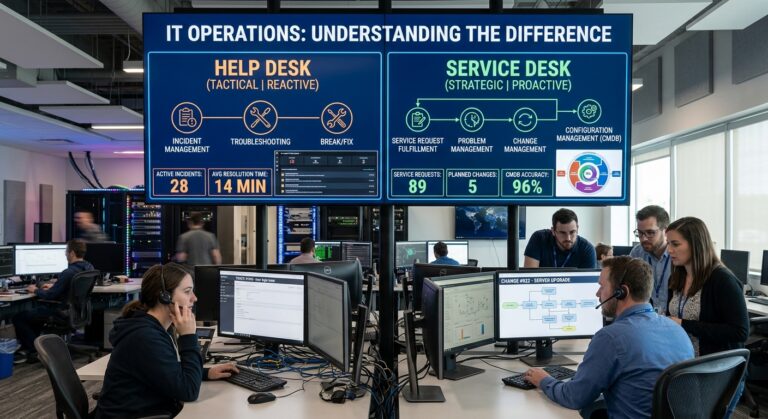
IT operations professionals compare help desk and service desk functions, from incident troubleshooting to service requests and change management.
Every few months I sit in a meeting where the help desk vs service desk distinction gets ignored, and someone uses the two terms as if they were the same thing. Usually it’s harmless. Sometimes, however, it isn’t. For example, I once watched a company spend close to a year shopping for a “service desk” when what they really wanted was a faster way to close password tickets. As a result, they bought a platform built for change approvals, configuration records, and service catalogs, then used about a tenth of it. Meanwhile, the rest sat there, licensed and untouched, while the same three issues kept flooding the queue every Monday.
That experience is the reason I care about the help desk vs service desk question. After all, it isn’t a vocabulary debate. In fact, the label you pick shapes how you staff the team, what you measure, which tool you buy, and how the rest of the business sees IT. So if you get it wrong, you either overbuild a support function you can’t sustain or underbuild one that collapses the first time the company doubles in size.
I’ve spent most of my career in IT service management, building desks from scratch, rescuing ones that were drowning, and moving teams from one model to the other. Therefore, what follows is how I explain the difference to the people who actually have to run these operations.
Why the Help Desk vs Service Desk Terminology Matters
Part of the confusion is that the industry itself is inconsistent. For instance, Atlassian markets the same product as help desk software on one page and as a service desk on another, and Zendesk sells a single platform that covers help desk, service desk, and ITSM. So if the vendors can’t keep the words apart, it’s no surprise that buyers can’t either.
Similarly, the support centers themselves are just as mixed. In HDI survey data that Atlassian has republished, 36% of support centers call themselves a service desk, 23% call themselves a help desk, and the remaining 41% use some other name entirely. Consequently, you can’t assume that a team calling itself a service desk actually operates like one.
That’s why I always judge the function, not the sign on the door. First, what does the team actually do all day? Next, what happens after a ticket closes? Finally, who owns the problem when the same fault shows up for the fifth time? Together, those answers tell you which model you’re really running.
What a Help Desk Actually Does
A help desk exists to fix things and get people working again. For example, someone’s laptop won’t connect to the VPN, the printer on the third floor is jammed, or an account is locked. The user reaches out, a technician troubleshoots, and then the issue gets resolved and the ticket closes. Clean and fast.
In ITIL terms, help desks mainly focus on a single practice: incident management. However, that narrow focus is a strength, not a weakness. A good help desk is quick, cheap to run, and easy to understand. Besides, there’s very little process overhead. The technicians know the environment, they also know the common faults, and so they clear the queue.
Where the Help Desk Model Falls Short of a Service Desk
Where the help desk model starts to struggle is repetition. Because the job is to restore service and move on, help desks tend to work independently and prioritize speed over root cause analysis. As a result, the same incidents can keep coming back. In fact, I’ve walked into organizations where one flaky network switch had generated hundreds of tickets over two years. Every single one was resolved. Yet nobody ever fixed the switch.
It’s also worth noting who usually raises the tickets. In practice, help desks lean more customer facing, whereas service desks are more often internal. For instance, a software company supporting its paying users with a ticketing tool is often running a help desk, even if the product page says otherwise.
What a Service Desk Actually Does
The service desk, on the other hand, grew out of a different way of thinking about IT. Specifically, it evolved from the help desk through ITIL, built on the idea of managing IT as a service. So instead of asking “what broke,” a service desk asks “what service does this person need, and how do we deliver it reliably?”
How ITIL Defines the Service Desk
ITIL 4 keeps the formal definition simple: the service desk is the point of communication between the service provider and its users. Moreover, that communication covers not just break and fix work but also service requests, questions, announcements, and updates. Likewise, the ITIL 4 practice guide states that the purpose of the practice is to capture demand for incident resolution and service requests, and to act as the entry point and single point of contact for all users.
That “single point of contact” idea is the heart of it. In other words, users shouldn’t have to know whether their issue belongs to networking, the application team, or facilities. Instead, they go to one place, and the service desk routes, tracks, and communicates.
What Sits Behind the Service Desk
The bigger difference, however, is what sits behind the desk. Service desks add problem management, change management, service level management, and configuration management on top of incidents and requests. In a typical setup, for example, a service desk takes in service request management, incident management, knowledge management, self service, and reporting. Thus, the desk becomes the front end of a much larger service management system.
Service Empathy
In addition, there’s one piece of ITIL 4 guidance I wish more teams paid attention to: service empathy. ITIL defines it as the ability to recognize, understand, predict, and project another party’s interests, needs, intentions, and experiences so the service relationship can be built and improved. In plain language, a service desk is supposed to understand the user’s day, not just their error message.
Help Desk vs Service Desk: The Differences That Show Up in Daily Operations
Here’s the comparison I use when I’m briefing leadership teams. Of course, it’s not about which one is “better.” Rather, it’s about fit.
| Area | Help Desk | Service Desk |
|---|---|---|
| Core purpose | Restore service and fix issues | Deliver and manage IT services end to end |
| ITIL scope | Mostly incident management | Incidents, requests, problems, changes, knowledge, service levels |
| Posture | Reactive | Proactive and preventive |
| Main question | What broke? | What does the user need, and why does it keep happening? |
| Typical users | Often customers or external users | Often internal employees across the business |
| Key metrics | Response time, resolution time, ticket volume | First level resolution, SLA attainment, recurring incident reduction, user satisfaction |
| Tooling | Ticketing with basic reporting | ITSM platform with service catalog, CMDB, workflows, analytics |
| Relationship to ITSM | A subset of the service desk | One function within the wider ITSM practice |
That last row matters. Atlassian puts it neatly: a help desk fixes issues, a service desk delivers IT services and handles requests, and ITSM manages the entire service lifecycle. Therefore, think of them as nested circles rather than competitors. Now let me walk through the differences that actually change how a team operates.
Reactive Help Desk vs Preventive Service Desk
A help desk waits for the phone to ring. A service desk still answers the phone, but it also looks at the pattern of calls and asks why they happened. In short, help desks respond to incidents as they show up, while service desks use proactive problem, change, and knowledge management.
In practice, this means a service desk analyst who spots five tickets about the same email client crash doesn’t just close five tickets. Instead, they link them, raise a problem record, and hand it to someone who can find the root cause. Above all, that single habit is often the biggest operational difference between the two models.
Help Desk Tickets vs Service Desk Services
Help desks think in tickets. Service desks, by contrast, think in services. For example, when a new employee starts, a help desk might handle a dozen separate tickets: laptop, email, VPN, software licenses, building access. A service desk, however, treats onboarding as one service, defined in a catalog, with a standard workflow and a clear owner. As a result, the user makes one request, and the desk orchestrates the rest.
How Changes Are Handled
On many help desks, changes happen informally. For instance, a technician patches a server or reworks a VLAN because it seemed like a good idea at the time. A service desk, on the other hand, connects to a change process so that anything touching production, from a firewall rule to an IPv6 rollout, is logged, assessed, and communicated. Indeed, this is where a lot of outages, including the kind of routing mistakes that have taken global brands offline, are either prevented or caused. In my experience, the teams that resist change management the most are usually the ones generating the most incidents.
What Gets Measured on a Help Desk vs Service Desk
Help desk metrics tend to focus on speed and volume. Those are fine, but they can also reward the wrong behavior. After all, if you only measure tickets closed, nobody has a reason to stop tickets from arriving. Service desks, therefore, layer in measures like first level resolution, SLA attainment, the rate of recurring incidents, and satisfaction scores. That’s why, when I take over a desk, the first thing I look at is not how fast tickets close, but how many of them are repeats.
Knowledge and Self Service
Both models can have a knowledge base. However, service desks treat knowledge as a core practice rather than a nice extra. Every resolved incident, for example, is a chance to write or improve an article. Over time, that knowledge feeds self service, which is where the real savings live.
Help Desk vs Service Desk Costs: Cost Per Ticket and Shift Left
If you need to make the business case for evolving from a help desk to a service desk, the cost per ticket data is the most persuasive argument I know.
What MetricNet’s Benchmarks Show
MetricNet has benchmarked support costs for years. According to their North American figures, a ticket handled at Level 1 by the service desk costs roughly $22, while the same issue solved through self service at Level 0 costs about $2. Furthermore, desktop support at Level 2 runs around $70, Level 3 IT about $100, field support around $220, and vendor support can reach $600 per ticket.
Look at that ladder. Every time a ticket moves one step to the right, the cost jumps. MetricNet’s Jeff Rumburg explains why: resolution costs rise at each level because handle times get longer and, in addition, the people above the service desk earn higher salaries. If you outsource support, the same ladder also drives what you’ll pay in managed IT services.
How Shift Left Works
This is the logic behind “shift left,” a core service desk strategy. Essentially, the idea is to move recurring, low value requests out of Level 1 and into cheaper channels like automated self help. At the same time, you push work that’s currently escalated back toward Level 1 by giving frontline analysts better knowledge and access. In fact, MetricNet’s benchmarking found that just over 18% of tickets resolved by desktop support could have been handled by a service desk analyst.
A pure help desk, however, rarely does this well, because shift left requires problem management, knowledge management, and good data. Those, of course, are service desk capabilities.
A Warning About Self Service
Still, there’s one warning I always give. Shift left only saves money if the ticket actually gets resolved at the lower level. As EasyVista points out, a self service request that bounces back to Level 1 because of a bad knowledge article, a confusing portal, or broken automation doesn’t cost $2. Instead, it costs $2 plus the $22 Level 1 cost, plus any further escalation. Consequently, I’ve seen organizations launch a shiny portal, call it a win, and then quietly raise their total support cost because users gave up on it and called anyway.
Where Help Desk and Service Desk Lines Blur
I’ll be honest: in the real world, most teams sit somewhere between the two models. Red River, for example, makes a fair point that most companies need both kinds of support, with the help desk keeping daily processes running and the service desk handling the broader IT work. Here are some practical examples of how this blending looks.
A Small Company With a Mature Mindset
I’ve worked with a 60 person firm that ran a tiny two person IT support desk but still did problem reviews every Friday. Technically, it was a help desk by size and tooling. Operationally, though, it was a lot closer to a service desk.
A Help Desk Inside a Service Desk
Similarly, plenty of big organizations run a service desk as the single point of contact, with a specialized help desk underneath it for a particular application or customer group.
A Help Desk That Calls Itself a Service Desk
This is the most common one I see. The tool says service desk, and the job titles say service desk too. Yet nobody owns problems, changes happen on a whim, and nobody has updated the knowledge base in a year.
Atlassian’s view is that a service desk is essentially a help desk built in the ITIL mold. I agree with that, and I’d also add that the mold only matters if you actually use it.
Help Desk vs Service Desk: How to Tell Which One You Need
When an IT manager asks me which model is right for them, I ask a handful of questions.
How Big and Complex Is the Environment?
SolarWinds offers a fair rule of thumb: if your team is small, ticket volume is low, and your needs are purely reactive, a lightweight help desk may be enough for now. For example, a 30 person office with standard laptops, a simple small business network setup, and a few SaaS apps doesn’t need a CMDB.
Are the Same Issues Coming Back?
If you can name your top five recurring tickets from memory, such as VPN drops or name resolution failures, you have a problem management gap. Therefore, that’s a strong signal you need service desk practices, even if you keep the team small.
Do Changes Cause Outages?
If your worst incidents trace back to unplanned or poorly communicated changes, then you need change enablement connected to the desk.
Is IT Supporting Business Services?
Once leadership expects IT to deliver onboarding, access management, and application availability as defined services with agreed levels, you’ve clearly outgrown a basic help desk.
Are You Facing Audits or Compliance?
Regulated industries usually need the traceability that comes with service desk processes. After all, a spreadsheet of closed tickets won’t satisfy an auditor asking how a change to a financial system was approved.
Is the Company Growing Fast?
Growth is the most common trigger I see. A help desk that worked fine at 100 people often breaks at 400, because informal knowledge doesn’t scale and, moreover, the same technicians can’t keep everything in their heads.
In short, if you answered yes to two or more of those, it’s time to start building toward a service desk.
Moving From Help Desk to Service Desk Without Breaking Things
I’ve led this transition several times, and the biggest lesson is to go in stages. Teams that try to implement every ITIL practice at once, for instance, usually end up with a lot of process documentation and very little change in daily work. Here’s the sequence that has worked best for me.
Step 1: Separate Incidents From Requests
Before anything else, split “something is broken” from “I need something.” It sounds basic. However, mixing them ruins your data and your SLAs. Requests should therefore have their own forms, approvals, and fulfillment paths.
Step 2: Build a Small Service Catalog
Start with the ten requests you get most often. Then define each one clearly: what it is, who can ask for it, who approves it, and how long it should take. Above all, don’t try to catalog everything on day one.
Step 3: Start Problem Management With Repeat Offenders
Pick your three most frequent incident types and assign owners to find the root cause. In my experience, early wins here build trust with leadership faster than anything else.
Step 4: Make Knowledge Part of Closing a Ticket
If an analyst solved something new, the ticket isn’t done until there’s an article. Ultimately, this is the foundation for shifting left later.
Step 5: Connect the Desk to Change
You don’t need a heavy change advisory board. Instead, you need visibility. At minimum, the desk should know what’s changing and when, so that they aren’t blindsided when calls start coming in.
Step 6: Introduce Self Service Carefully
Launch it with your best knowledge content, and then test it with real users. In addition, track how many self service attempts still end up as tickets, since that number tells you whether shift left is actually working.
Step 7: Measure Outcomes, Not Activity
Finally, replace “tickets closed” as your headline metric with first level resolution, recurring incident rate, and user satisfaction.
Choosing the Right Help Desk or Service Desk Tool
On the tooling side, choose a platform that can grow with you. Many mid market teams don’t need a full enterprise ITSM suite on day one. Even so, they do need something that won’t force a painful migration two years later. For example, tools like ServiceNow and Jira Service Management can be configured lightly at first and then expanded as practices mature.
Help Desk vs Service Desk Mistakes I See Teams Make
A few patterns come up again and again.
Buying the tool before defining the process. A service desk platform won’t give you problem management if nobody is assigned to do it. In other words, software encodes your process; it doesn’t invent one.
Renaming without changing. Changing the team name from help desk to service desk without adding any new practices just confuses users and, in addition, frustrates staff.
Treating ITIL as a rulebook. ITIL 4 is guidance, and in fact it explicitly encourages adapting practices to your context. That’s why the best service desks I’ve worked with took what they needed and left the rest.
Ignoring the people side. Moving to a service desk changes jobs. For example, analysts who were rewarded for speed now need to write knowledge, link tickets, and escalate thoughtfully. So if you don’t train and recognize those new behaviors, people will drift back to the old ones.
Forgetting the user. Every process you add should make life easier for the person asking for help, not harder. Otherwise, if users need to fill out a ten field form to report a broken mouse, you’ve lost the plot.
Final Thoughts on Help Desk vs Service Desk
Ultimately, the help desk vs service desk question comes down to scope and maturity. A help desk restores service quickly and does it well. A service desk does that too, and then goes further: it manages requests as services, prevents repeat issues, connects to change, and treats knowledge as an asset. In short, one is tactical, while the other is strategic.
Neither is wrong, of course. A small team with simple needs can run a great help desk for years. However, once your environment gets more complex, your users expect more, or the same problems keep coming back, the service desk model starts paying for itself, often quite literally, through lower cost per ticket and fewer escalations.
So my advice is simple. First, look at what your team actually does, not what it’s called. Next, fix the repeats. Then build knowledge relentlessly. Finally, grow into a service desk one practice at a time rather than all at once.
Frequently Asked Questions
What is the main difference between a help desk and a service desk?
A help desk focuses on fixing issues and restoring service, mostly through incident management. A service desk, however, acts as the single point of contact for all IT services and also adds request fulfillment, problem management, change coordination, and knowledge management. Atlassian offers a clear breakdown in its ITSM comparison guide.
Is a service desk part of ITIL?
Yes. In fact, ITIL 4 treats the service desk as one of its formal practices, describing it as the point of communication between the service provider and its users. By contrast, the help desk term doesn’t appear in ITIL publications. See the ITIL 4 practice guide summary on ITSM.tools.
Can a company run both a help desk and a service desk?
Yes, and many do. For example, larger organizations often run a service desk as the central contact point with specialized help desks underneath for specific applications or customer groups. Red River covers this in its IT support model comparison.
Is a service desk more expensive than a help desk?
The service desk usually has higher setup and tooling costs. However, it often lowers total support costs over time by resolving more tickets at Level 1 and shifting simple requests to self service. MetricNet explains the economics in its cost per ticket analysis.
When should a business move from a help desk to a service desk?
Common signs include recurring incidents, outages caused by unmanaged changes, rapid company growth, compliance requirements, and leadership expecting IT to deliver defined business services. Similarly, SolarWinds outlines these triggers in its guide on choosing the right support model.
What is shift left in a service desk?
Shift left means moving work toward cheaper, faster resolution points, from specialists down to Level 1 analysts and from Level 1 to self service. However, it only saves money if those tickets are actually resolved at the lower level. HDI explains the approach in its shift left article.
References
- Atlassian. IT Service Desk vs IT Help Desk vs ITSM: What’s the Difference? atlassian.com
- Atlassian. Help Desk vs. Service Desk: What’s the Difference? atlassian.com
- ITSM.tools. IT Service Desk vs. IT Help Desk: What Do You Need? itsm.tools
- ITSM.tools. Master the ITIL 4 Service Desk Practice. itsm.tools
- InvGate. 5 Key Guidance Points in the ITIL 4 Service Desk Practice. invgate.com
- SolarWinds. Help Desk vs. Service Desk: Understanding the Key Differences. solarwinds.com
- Ivanti. What’s the Difference Between a Help Desk and a Service Desk? ivanti.com
- ManageEngine. Help Desk vs. Service Desk: Key Differences. manageengine.com
- Red River. Help Desk vs. Service Desk: What’s the Difference? redriver.com
- eesel AI. Help Desk vs Service Desk: What Actually Separates Them. eesel.ai
- MetricNet. Metrics Unleashed: Shift Left. metricnet.com
- HDI. Why Your Service Desk Needs to Implement Shift Left. thinkhdi.com
- HDI and MetricNet (Jeff Rumburg). First Level Resolution. thinkhdi.com
- EasyVista. Shift Left: Not a Strategy but an Outcome. easyvista.com
- Giva. Shift Left IT Service Management Analysis and How To Guide. givainc.com
About the Author