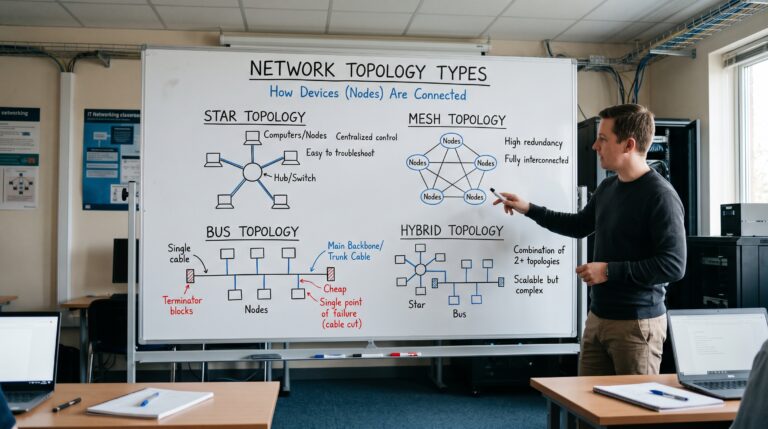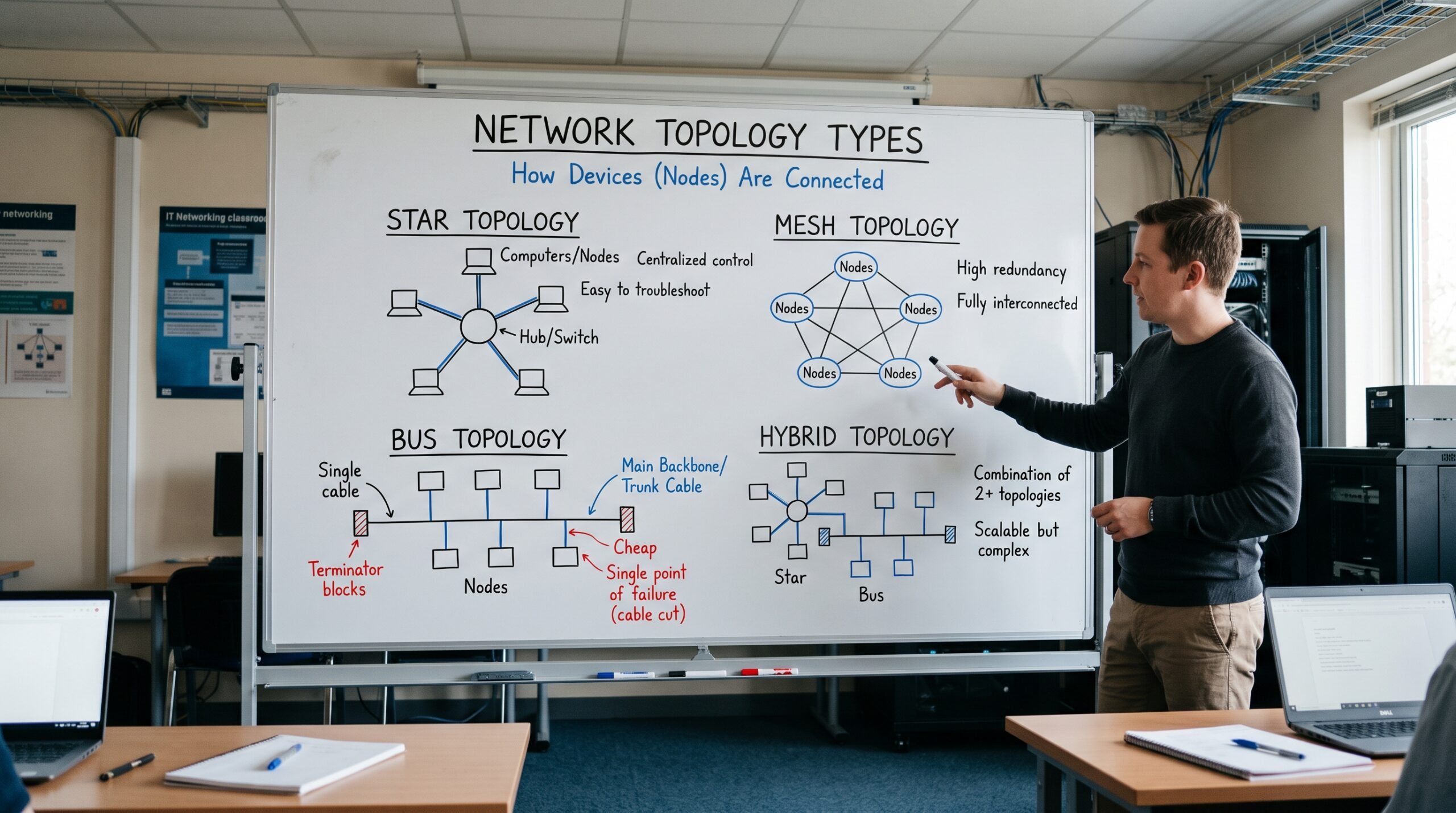
Understanding network topology types helps IT professionals design reliable, scalable, and efficient computer networks.
Early in my career, I was handed a floor plan, a budget and one instruction: “make it never go down.” That project taught me something about network topology types that I still tell junior engineers. In short, the shape of a network decides how it fails, how much it costs and how painful it is to grow. So before anyone picks a switch vendor or argues about wireless, someone has to decide how the pieces connect. That decision is topology.
Over the years, I have designed networks for law offices with twelve people, for multi building campuses and for data center fabrics that carry more east and west traffic in an hour than some companies see in a year. Across all of them, however, the same four network topology types keep coming up: star, mesh, bus and hybrid. In this guide, I want to explain each one the way I would explain it to a client across a conference table. That means what it is, where it works, where it breaks and, most importantly, what it really costs over its life.
Understanding Network Topology Types: Physical and Logical
At its simplest, topology is the map of how nodes connect to each other. For instance, IBM describes it as the physical and logical arrangement of nodes and connections in a computer network, which governs how data flows between devices.
That physical and logical distinction, in fact, matters more than most people think. The physical topology is the cabling and hardware you can touch. The logical topology, on the other hand, is the path data actually takes. As a result, the two often look nothing alike, especially in larger networks where traffic has several possible routes. Because of this, all network topology types should be understood on both levels.
Here is a real example. A building can be cabled as a perfect star, with every desk running back to a switch in the wiring closet. On top of that, however, VLANs, tunnels and routing policies can create a logical layout that behaves very differently. Therefore, when I troubleshoot, I always ask which map we are looking at first, because the answer changes where I start.
Why Choosing Between Network Topology Types Is a Business Decision
For firms in professional services such as accounting, consulting, legal and staffing, the network is the office. In other words, when it stops, billable hours stop with it. Consequently, choosing between network topology types is really a choice about four things:
Failure tolerance. First, how many things can break before people stop working?
Cost. Second, what will it cost, not just to install, but also in cabling, ports, power, licensing and the hours your team spends running it?
Scalability. Third, can you add a floor, a branch or fifty new hires without tearing things apart?
Manageability. Finally, can a two person IT team actually run it, or does it need a specialist on call?
Similarly, NordVPN’s guide makes a point I agree with completely: simpler designs are usually cheaper to build, while more complex ones can pay for themselves later by cutting downtime and maintenance. Indeed, I have seen companies save a few thousand dollars on cabling and then lose much more than that in a single afternoon of downtime.
With that in mind, keep those four factors close as we go through each of the network topology types below.
Bus Topology: The Oldest of the Network Topology Types
How It Works
A bus topology connects every device to one shared cable, usually called the backbone or trunk. When one device transmits, the signal travels the full length of the cable, and therefore every node sees it. Each device then decides whether the message is meant for it.
If you worked with early Ethernet, for example, you remember thick and thin coaxial cable snaking from desk to desk with a terminator at each end. That was a bus. Unfortunately, if you pulled one connector loose in the wrong place, the whole segment went quiet. Even now, people who worked through that era still get a little nervous around BNC connectors.
Where Bus Still Lives Today
Many articles describe bus as the one network topology type that has died out. In reality, it has not. Instead, it moved out of the office and into machines. For example, the Controller Area Network used in vehicles and industrial equipment is a linear bus, and it still follows the old rules about termination. Specifically, ISO 11898-2 CAN networks must be terminated at each end using 120 Ohm terminal resistors. In addition, controls engineers taught me a practical check: with the system powered down, a properly terminated bus should read around 60 ohms between CAN High and CAN Low.
So if your firm advises manufacturers, fleet operators or building automation clients, bus topology is still very much part of the conversation.
Strengths
To begin with, the cabling is minimal and cheap. It is also easy to understand and simple to set up for a small number of devices. Moreover, it works well for low bandwidth control traffic where devices share short messages.
Weaknesses
On the downside, the trunk is a single point of failure. Bandwidth is also shared, so performance drops as you add nodes. Furthermore, as more devices compete for the same cable, collisions rise and the whole segment slows down. Finding a fault is slow as well, because a break anywhere can look like a failure everywhere.
My Take
For that reason, I would never put a bus at the center of a modern office LAN. Still, I respect it in its niche. For embedded and industrial systems, after all, it is light, cheap and predictable, and those are exactly the right qualities for that job.
Star Topology: The Workhorse Among Network Topology Types
How It Works
In a star topology, every device connects to a central point, which today is almost always a switch. As a result, devices do not talk to each other directly. Instead, everything passes through the center.
Walk into nearly any office, and you are standing inside a star. Each wall jack runs back to a patch panel, then the patch panel connects to a switch, and finally the switch sends traffic where it needs to go. In fact, of all the network topology types, the star is the one most small businesses mean when they say “the network.”
Strengths
Fault isolation. If one cable or laptop fails, only that device drops. Meanwhile, everyone else keeps working. This, above all, is the main reason the star replaced the bus.
Easy troubleshooting. Because every connection runs to one place, I can check the port status when a user calls and know within seconds whether the problem is the cable, the device or something upstream.
Simple growth. Likewise, adding a user means running one cable and patching one port.
Central control. Finally, security policies, Power over Ethernet for phones and access points, and monitoring all happen at the switch.
Weaknesses
However, the center is everything. If the central switch fails, every device attached to it goes offline at once, so the whole star is only as strong as that one box and its links.
Cabling also adds up, since every device needs its own run back to the closet. Besides that, a single switch has a fixed number of ports, so growth eventually means adding switches. Eventually, that pushes you toward a hybrid design whether you planned for one or not.
How I Harden a Star
Whenever a client tells me their office “is just a star,” my next questions are about the center. For example, is there a spare switch on the shelf? Is the switch on a UPS? Are the uplinks to the firewall doubled up? Simply put, a star with a single unprotected switch is a small business waiting for its worst Monday. By contrast, a star with redundant power, a spare unit and a documented swap procedure is one of the most reliable designs you can buy for the money.
Mesh Topology: The Most Redundant of the Network Topology Types
How It Works
In a mesh topology, nodes connect to several other nodes, so traffic has more than one path to its destination. Consequently, if one link fails, traffic simply takes another route.
There are, moreover, two flavors. In a full mesh, every node connects directly to every other node. In a partial mesh, by comparison, only some nodes have multiple connections, usually the critical ones.
The Math That Keeps Full Mesh Rare
Here is the calculation I put on the whiteboard for every client who asks for “full redundancy everywhere.” In a full mesh with n nodes, the number of links is n times (n minus 1), divided by 2.
For example, five sites need 10 links. Ten sites, however, need 45. Twenty sites need 190. On top of that, each of those links has a circuit cost, an interface on each end and a line in the monitoring system. In other words, the cost grows much faster than the network, so full mesh only makes sense for a small set of very critical nodes.
Where Mesh Earns Its Keep
Data center fabrics. First of all, the spine and leaf design, also called a Clos fabric, is now the modern standard. Every leaf switch connects to every spine switch, but leaves never connect to other leaves, and likewise spines never connect to other spines. Put differently, the mesh exists between the two layers rather than inside either one. Because of that structure, every server has a predictable number of hops to every other server. In addition, the IETF documented this approach in RFC 7938, which describes BGP routing for data centers that support over one hundred thousand servers.
WAN cores. Similarly, partial mesh between headquarters, a disaster recovery site and the largest branches is a common pattern. Thus, the branches that matter most get multiple paths, while smaller sites hang off them.
Wireless mesh. Lastly, mesh WiFi systems and outdoor wireless backhaul let access points relay traffic to each other. This is especially useful in warehouses, older buildings where new cable is not practical, and outdoor spaces.
Strengths
Above all, mesh offers high fault tolerance with no single point of failure for the meshed nodes. In addition, traffic can be balanced across several paths. Furthermore, in a well built fabric, performance stays consistent as you scale.
Weaknesses
On the other hand, it is expensive in links, ports and optics. Configuration is also complex, especially routing and loop prevention. Not only that, but it takes skilled staff to design, document and operate it.
My Take
In my view, mesh is a scalpel, not a hammer. Therefore, I use it where downtime is truly unacceptable and the budget agrees. For a ten person consulting firm, for instance, a full mesh is overkill. Conversely, for the core that connects a firm’s primary office, its cloud provider and its backup site, a partial mesh is often the smartest money they will spend.
Hybrid Topology: How Network Topology Types Combine in Real Networks
How It Works
A hybrid topology combines two or more network topology types in one network. In practice, though, this is not an exotic choice. On the contrary, it is what almost every network becomes once it outgrows a single closet.
For example, IBM points out that a tree network, which joins stars to a bus style backbone, is itself a kind of hybrid. Today, by far the most common hybrid I build is a star at the edge, where users and devices connect, with a meshed or redundant core above it.
The Hierarchical Campus Model
Cisco’s hierarchical model is the best known hybrid design, and for good reason. Essentially, it divides the network into three layers:
Access layer. First, stars of switches where users, phones, printers and access points connect.
Distribution layer. Next, a layer that aggregates access switches and applies policy. Each access switch usually has two uplinks here.
Core layer. Finally, a fast, redundant backbone connecting the distribution blocks, the data center and the WAN edge.
According to Cisco Press, availability comes mainly from giving each layer two paths to the layer above it. So, while users sit in a star, the layers above them run a partial mesh. In other words, that is a hybrid built on purpose.
Of course, smaller organizations do not need all three layers. Instead, they can merge the core and distribution roles into one pair of switches, which is called a collapsed core. In fact, that is where I start most professional services firms with one or two floors.
There is also a clear signal for when to add a dedicated core. Without one, the distribution switches have to be fully meshed with each other, and that gets messy quickly as the campus grows. As a general rule, then, add a core when connecting three or more buildings or four or more pairs of building distribution switches. Personally, I have used that rule of thumb for years, and it holds up.
Strengths
To start, you put redundancy where it matters and save money where it does not. Moreover, the design grows by adding blocks rather than redesigning. Also, because the pieces are separate, problems are easier to isolate.
Weaknesses
Nevertheless, there are more moving parts, so documentation has to be good. You also need consistent standards; otherwise, each block turns into its own mess. Above all, design mistakes at the core affect everyone.
My Take
Whenever someone tells me their network is a pure star or a pure mesh, I usually find a hybrid once I open the closet. Thus, the goal is not to avoid mixing network topology types. Rather, the goal is to make the hybrid deliberate, documented and consistent, instead of the result of ten years of “just plug it in over there.”
Comparing the Four Network Topology Types
To summarize, here is how I lay out the trade offs for clients:
| Topology | Upfront Cost | Fault Tolerance | Scalability | Management Effort | Best Fit |
|---|---|---|---|---|---|
| Bus | Very low | Low | Poor | Low at small scale | Industrial and vehicle control systems |
| Star | Moderate | Good for edge devices, weak at the center | Good up to switch capacity | Low | Small and midsize offices |
| Mesh | High | Very high | Strong in fabric designs | High | Data centers, WAN cores, critical links |
| Hybrid | Moderate to high | High where designed | Very strong | Moderate to high | Growing firms, campuses, multi site companies |
How I Choose Between Network Topology Types for a Client
Whenever I scope a new design, I work through the same questions in the same order.
1. What does an hour of downtime cost? First, I ask the business, not the IT team. In many cases, a partner at a law firm will give a much higher number than the network budget suggests. That number then either justifies redundancy or rules it out.
2. Where does traffic actually go? In the past, office networks moved most traffic in and out of the building. Today, however, much of it goes to cloud applications, which changes where the redundancy belongs. As a result, the internet edge and firewall often deserve more protection than the internal core does.
3. How many people, devices and sites in three years? Accordingly, I design for the growth plan, not the current headcount. Moving a star to a collapsed core later is easy if you planned for it. Otherwise, it is painful.
4. Who will run it? After all, a brilliant design that nobody on staff understands is a liability. For that reason, I would rather deliver a simpler hybrid that the in house team can support than a perfect mesh they are afraid to touch.
5. What does compliance require? Lastly, firms that handle financial, legal or health records often need segmentation that affects the logical topology, even when the physical layout stays the same.
Recommended Network Topology Types by Firm Size
Under 25 people, one office. In this case, a single star built on a good managed switch, with a spare unit and a UPS. Also, add a second internet circuit before you add network complexity. Our small business network setup guide walks through this in detail.
25 to 200 people, one or two floors. Here, a collapsed core hybrid works best. Specifically, access switches in each closet with dual uplinks to a redundant pair of core and distribution switches.
Multiple offices. For these firms, stars at each branch, a partial mesh WAN between the important sites and the cloud, and software defined WAN to manage the paths.
Firms running their own data center or private cloud. Finally, a spine and leaf fabric for the server side, connected to a hierarchical campus for users.
Common Mistakes With Network Topology Types in the Field
Daisy chaining switches. First, plugging one switch into another into another builds an accidental chain where every link is a single point of failure. Surprisingly, I find this in about half of the small offices I audit.
Redundancy that shares a fate. Similarly, two “redundant” switches plugged into the same power strip, or two internet circuits that enter the building through the same conduit, are not really redundant.
No current diagram. Likewise, a topology that only exists in one person’s head disappears when that person leaves. Therefore, keep physical and logical diagrams, and update them every time something changes.
Overbuilding for prestige. In addition, I have seen small firms buy data center grade gear to run a few dozen laptops. Instead, the money would have gone further on backups, security and a second internet connection.
Ignoring wireless. Finally, most users now connect over WiFi. Consequently, the access points, their uplinks and their power are part of the topology and need the same planning as wired ports.
The Future of Network Topology Types
Admittedly, the fundamentals in this guide are not going away, but the way we apply network topology types keeps changing. For example, overlay technologies let us build logical topologies that sit on top of the physical layer. Likewise, software defined WAN lets branches treat several internet links as one smart, redundant path. Meanwhile, cloud networking adds virtual networks that follow the same star, mesh and hybrid patterns, only described in code instead of cable.
This is also why demand for people who understand topology keeps growing. According to the U.S. Bureau of Labor Statistics, the median annual wage for computer network architects was $130,390 in May 2024, and employment is expected to grow 12 percent between 2024 and 2034, well above the average for all occupations. In short, businesses are not paying for someone to plug in cables. Rather, they are paying for judgment about how the pieces should connect.
Final Thoughts on Network Topology Types
Ultimately, every one of these network topology types exists because it solves a real problem. Bus keeps machines talking with very little wire. Star, meanwhile, gives offices simple, fault isolated connections. Mesh, in turn, provides the redundancy that critical systems need. Finally, hybrid lets you combine all of them, putting resilience where it pays and simplicity everywhere else.
So if you remember one thing from this guide, make it this: choose your topology based on what failure would cost the business, and then build the simplest design that keeps that cost acceptable. After that, everything else is details, and details are exactly what good documentation is for.
Frequently Asked Questions About Network Topology Types
What are the main network topology types?
The core network topology types are bus, star, ring, mesh, tree, point to point and hybrid. In business networks, however, star, mesh and hybrid are the most common, while bus survives mainly in industrial and vehicle systems. For a visual overview, see IBM’s guide to network topology.
Which network topology is best for a small business?
For most small offices, a star built around a quality managed switch is the best balance of cost, reliability and ease of support. In addition, protect the central switch with a UPS and keep a spare on hand. The DNSstuff topology guide also offers a useful look at matching topology to business size.
What is the difference between full mesh and partial mesh?
In a full mesh, every node connects directly to every other node. In a partial mesh, by contrast, only the critical nodes have multiple links. As a result, partial mesh is far more common, because full mesh link counts grow very quickly. NordVPN’s guide to network topology explains both with clear examples.
Is spine and leaf a mesh or a hybrid topology?
Technically, it is a full mesh between two layers, since every leaf connects to every spine, while leaves never connect to each other. For that reason, many engineers describe it as a structured mesh. Wevolver’s spine and leaf design guide breaks down the sizing and cabling.
Why is hybrid topology so common in enterprise networks?
Simply put, no single topology fits every part of a growing organization. Stars work well for user access, whereas meshed cores provide redundancy. Cisco’s hierarchical campus model is the best known example, and Cisco Press explains it in Designing High Availability in the Enterprise Campus.
Is bus topology still used today?
Yes, although it is rare in office LANs. Instead, it remains standard in vehicle and industrial control networks such as CAN, which uses a linear bus terminated at both ends. CSS Electronics explains the termination rules on its CAN bus terminal resistor page.
When should a company add a dedicated core layer?
Generally, add a core when connecting three or more buildings, or four or more pairs of distribution switches. Otherwise, a collapsed core is usually enough. Cisco Press covers this rule in its chapter on high availability in the enterprise campus, and Network World’s chapter on campus network design shows how small, medium and large campuses differ.
What does a computer network architect do?
Essentially, network architects design and build data communication networks, including LANs, WANs and intranets, and they also choose which network topology types fit the business. The Bureau of Labor Statistics profile of computer network architects covers duties, pay and outlook.
References
- Khan, T., Jackson, G., and Goodwin, M. What Is Network Topology? IBM Think
- Lapukhov, P., Premji, A., and Mitchell, J. RFC 7938: Use of BGP for Routing in Large Scale Data Centers, IETF
- U.S. Bureau of Labor Statistics. Computer Network Architects, Occupational Outlook Handbook
- Cisco Press. Designing High Availability in the Enterprise Campus
- Cisco Press. Enterprise Campus Hierarchical Design Models
- Network World. Chapter 1: Campus Network Design
- Wevolver. Spine and Leaf Architecture: Design, Sizing and Cabling
- NordVPN. What Is Network Topology? Definition, Types, and Diagrams
- DNSstuff. What Is Network Topology? Best Guide to Types and Diagrams
- CSS Electronics. Terminal Resistor (120 Ohm, CAN Bus)
About the Author